2026-08-27

Every paving company owner who runs a single crew has had the same thought: if I could just add one more crew, I could double my revenue. The logic seems simple. The reality is far more complicated — and far more dependent on the systems you have in place than the size of your workforce.
The most common growth story in the paving industry doesn't look like a steady climb. It looks like this: a contractor runs one crew successfully, adds a second, loses visibility, margins drop, the owner is exhausted from managing both personally, and the business stalls for two or three seasons at exactly the point where it should have taken off.
The gap between a one-crew operation and a five-crew scalable paving company is not a labour gap. It's a systems gap. The contractors who scale successfully don't just add people — they add the operational infrastructure that makes growth manageable, measurable, and profitable at every stage.
This guide maps exactly what that infrastructure looks like — crew by crew, stage by stage — and shows you precisely which Commander ERP modules to activate at each growth milestone to keep your margins intact and your operation in control as you scale.
of paving companies stall permanently at 1–2 crews due to systems failures, not market demand
more revenue per crew in 5-crew operations vs. single-crew — due to operational leverage
of paving company owners say lack of visibility is their top barrier to adding a crew
The two-crew wall is real — and it has nothing to do with not having enough work. Most paving contractors who stall at two crews have more bid opportunities than they can handle. The problem is that adding the second crew didn't come with the systems to manage it.
With one crew, the owner is on every job. They see every problem. They approve every decision. They know every cost. When a second crew is added, that direct oversight disappears — and if there's no system replacing it, the business starts running on assumptions, phone calls, and hope.
Every one of these problems is a systems problem — and every one of them is solved by activating the right Commander ERP modules at the right stage of growth. The five-stage framework below shows you exactly when and what to activate.
Building year-round revenue requires the operational systems to support multi-crew work at each stage of company growth — and that foundation starts with understanding where your business currently sits.
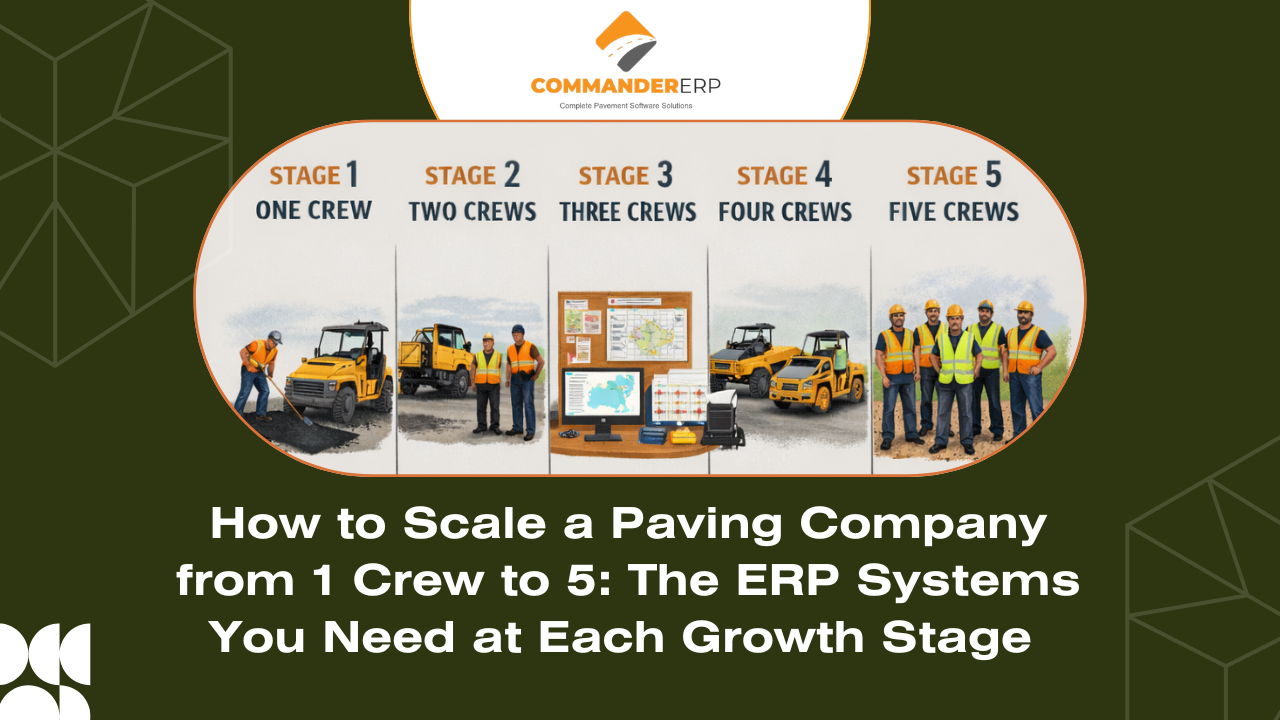
Each time you add a crew to your paving company, the nature of the business changes — not just the revenue potential. The problems you face, the systems you need, and the metrics you must track all shift. Here is the complete five-stage map:
| Stage | Team Size & Pain Point | ERP Modules Needed | Growth Goal | Key Metric |
|---|---|---|---|---|
| Stage 1 | 1 Crew (Owner-Operator) — Doing everything yourself: bidding, scheduling, invoicing, fieldwork | Estimating, basic job costing, invoicing, mobile time entry | Win your first 10 repeat clients. Know your true job margins. | Job margin % |
| Stage 2 | 2 Crews (First Hire) — Delegating without visibility; can't be on both jobs at once | Crew scheduling, foreman mobile app, real-time job status, CRM | Run two jobs simultaneously without being present at either. | Jobs run without owner |
| Stage 3 | 3 Crews (Mid-Size Growth) — Estimating bottleneck; bids taking too long, missing opportunities | Bid templates, historical cost benchmarks, proposal automation, pipeline tracking | Double your bid output without adding estimating headcount. | Bid-to-win rate |
| Stage 4 | 4 Crews (Operations Layer) — Overhead creeping up; admin, payroll, compliance, equipment costs out of control | Payroll integration, equipment maintenance scheduling, subcontractor management, reporting | Add management layer without losing margin to overhead growth. | Overhead as % of revenue |
| Stage 5 | 5+ Crews (Scalable Company) — Lack of data; can't make strategic decisions without real numbers | Executive dashboard, multi-crew P&L, fleet analytics, client retention reports, forecasting | Run the business from data, not from being on-site every day. | Revenue per crew |
The critical insight in this framework is that each stage requires different ERP capabilities — and trying to run a Stage 3 or Stage 4 operation on Stage 1 systems is the most common reason growth stalls and margins collapse. Commander ERP is designed to grow with you, activating new modules as your business reaches each stage rather than overwhelming a single-crew contractor with enterprise complexity.
Stage 1 is where your ERP habits are formed. The biggest mistake single-crew operators make is treating their ERP as an admin tool rather than a data engine. Every job you complete as a one-crew operation is teaching you something about your true costs, your most profitable job types, and your best clients.
The Commander ERP modules you must have running perfectly at Stage 1:
The goal at Stage 1 is simple: by the time you're ready to add a second crew, you should have 12 months of clean job cost data that tells you exactly what your labour rate really is, which job types make the most money, and which clients are worth growing with. That data is what makes Stage 2 safer.
Commander ERP Tip: Before you hire your first additional crew member, run the Job Profitability Report in Commander ERP and rank every job you completed in the past 12 months by margin. The top five job types — by profit margin percentage — should form the core of your Stage 2 growth target market.
Adding your first non-owner crew is the most important — and most dangerous — transition in a paving company's growth. The crew you add can generate as much revenue as your original operation. But they operate without the owner's constant oversight, judgment, and problem-solving.
The ERP modules that make Stage 2 work:
The right ERP systems make your second crew productive faster by eliminating the training and communication gaps that slow new team adoption — and the data you built in Stage 1 is exactly what makes onboarding faster.
At three crews, most paving companies hit their estimating ceiling. One person — usually the owner — is bidding for three crews worth of work on top of managing operations. The result: slower bids, more bid errors, and missed opportunities because there simply aren't enough hours.
Commander ERP solves this at Stage 3 by turning your historical job data into bid templates. Instead of building every estimate from scratch, your estimator starts from a template built on real cost data from similar past jobs — and adjusts for site-specific variables. Bid time drops from hours to minutes without sacrificing accuracy.
At three crews, multi-service capability becomes your most powerful competitive differentiator — and the ERP dashboard is what makes it manageable.
Four crews is where paving companies get fat and slow. Revenue is strong, but overhead has grown with it — and often faster. A manager or office coordinator has been hired. Equipment costs are rising. Payroll is complex. Subcontractors are being used. Insurance and compliance are more demanding.
At Stage 4, the job is not to grow revenue — it's to protect margin as the business gets larger. The ERP modules that do this:
A five-crew paving company is a real business — not a large job. At this stage, the owner's primary job is no longer doing the work or even managing the work directly. It's making strategic decisions: which markets to enter, which equipment to invest in, which clients to grow, and how to build the team that continues the growth.
None of those decisions are possible without data. And data — clean, complete, real-time data — is exactly what Commander ERP delivers at Stage 5 through its executive reporting and analytics suite:
At Stage 5, the contractors who succeed are the ones who have been building their data foundation since Stage 1. Every job, every client, every cost entered correctly in Commander ERP becomes a strategic asset — informing every hire, every bid, and every investment decision that drives the next phase of growth.
Here is the complete Commander ERP module activation roadmap — showing which capabilities to prioritise at each crew stage so you're never under-equipped for your current scale or overwhelmed by unnecessary complexity:
| ERP Module | Stage 1 | Stage 2 | Stage 3 | Stage 4 | Stage 5 |
|---|---|---|---|---|---|
| Estimating & Bidding | Active | Active | Active | Active | Active |
| Job Costing & Tracking | Active | Active | Active | Active | Active |
| Mobile App (Field Crew) | Active | Active | Active | Active | Active |
| CRM & Client Management | — | Active | Active | Active | Active |
| Crew Scheduling & Dispatch | — | Active | Active | Active | Active |
| Subcontractor Management | — | — | Active | Active | Active |
| Payroll & Time Integration | — | — | Active | Active | Active |
| Equipment Maintenance | — | — | — | Active | Active |
| Multi-Crew Dashboard | — | — | — | Active | Active |
| Executive Reporting & Forecast | — | — | — | — | Active |
| Fleet Analytics | — | — | — | — | Active |
| Client Retention Reports | — | — | — | — | Active |
The active markers show when each module becomes essential — not optional. Running a Stage 3 operation without subcontractor management or bid templates means leaving money on the table. Running a Stage 5 operation without executive reporting means making strategy decisions without data.
These are the five most common growth errors paving contractors make — and how Commander ERP's systems prevent each one from becoming a permanent ceiling on your company's growth:
| Growth Mistake | What Goes Wrong | The ERP-Backed Fix |
|---|---|---|
| Hiring crew before systems | New crew has no clear process to follow — quality and margins drop immediately | Build your ERP workflows first; crew follows the system, not the owner |
| Scaling bids without data | Win rate falls as volume grows — you're guessing on bigger numbers | Use historical job cost data from ERP to price every new crew's work accurately |
| Promoting best foreman to manager | Loses your best field operator, gains an untrained manager with no tools | Give foremen a Commander ERP dashboard before promoting — systems reduce the skill gap |
| Adding overhead without tracking | Admin, insurance, and equipment costs grow invisibly until margins collapse | ERP overhead allocation shows true cost per job before it erodes the P&L |
| No multi-crew visibility | Owner can't see what's happening across all jobs — decisions made on phone calls | Commander ERP's live job board gives real-time status on every crew without being present |
Before you add your next crew, use this checklist to confirm your systems are ready to support the growth — not just your workload:
If you can check all ten items, your systems are ready for the next crew. If fewer than seven apply, adding a crew before closing those gaps will likely result in the same stall pattern that traps most paving companies between two and three crews.
Learn more about asphalt paving .
average revenue growth within 3 seasons of ERP-structured scaling
of Commander ERP users report maintaining or improving margins while adding crews
average time from 1 crew to 3 crews with ERP-backed growth vs. 36 months without
Every paving contractor who has successfully scaled from one crew to five has one thing in common: they stopped running the business from memory, experience, and physical presence — and started running it from data, systems, and dashboards.
Commander ERP is the only platform purpose-built for exactly this journey in the paving industry. It grows with you — from the first estimate you build on Day 1 as a solo contractor to the executive dashboard that tells a five-crew operation where its next growth opportunity lies.
The work to build the next crew is hard. The work to build the system that makes that crew profitable doesn't have to be. Start with Commander ERP at whatever stage you're at today — and let every job you run from here build the foundation for the business you're scaling toward.
The fastest path to your next growth stage starts with proper ERP implementation — and Commander ERP makes that process straightforward from day one.
Ready to Move to Your Next Growth Stage?
Commander ERP scales with your paving company from day one — whether you're running your first crew solo or managing a five-crew operation. Every module activates as you need it, so you're never paying for complexity you haven't grown into yet.
Book Your Free Demo: commandererp.com
+1-435-823-2632 | info@commandererp.com